FreeIPA
Support level: Community
Preparation
The following placeholders are used in this guide:
svc_authentikis the name of the bind account.freeipa.companyis the Name of the domain.ipa1.freeipa.companyis the Name of the FreeIPA server.
FreeIPA Setup
-
Log in to FreeIPA.
-
Create a user in FreeIPA, matching your naming scheme. Provide a strong password, example generation methods:
pwgen 64 1oropenssl rand 36 | base64 -w 0. After you are done click Add and Edit.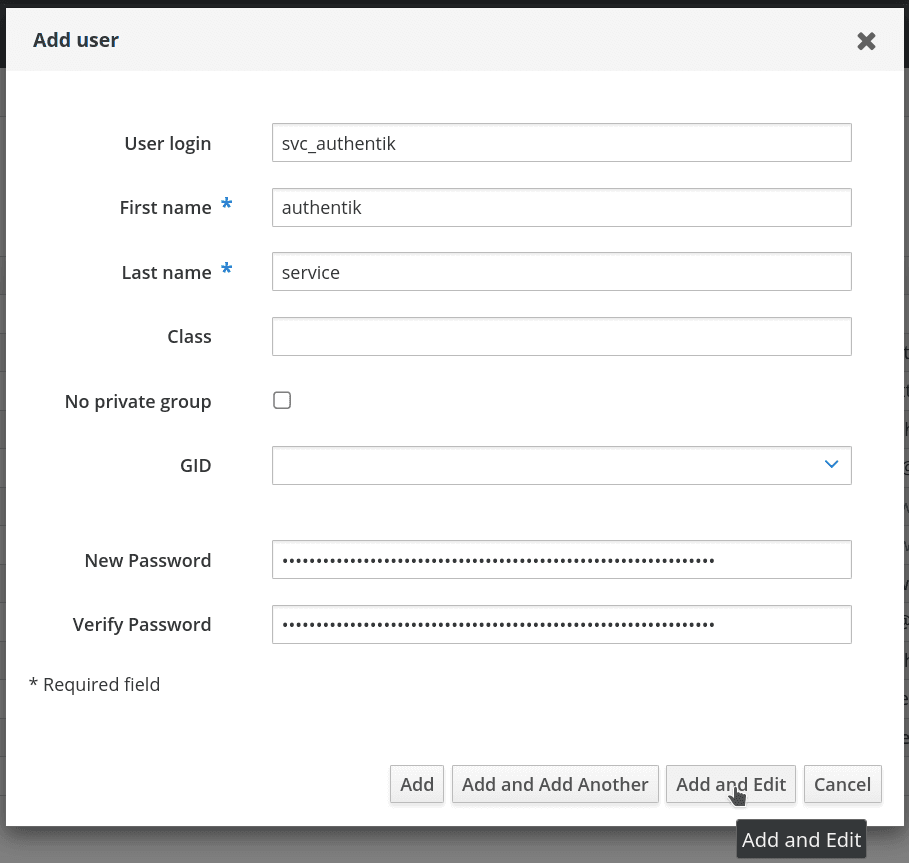
-
In the user management screen, select the Roles tab.

-
Add a role that has privileges to change user passwords, the default
User Administratorsrole is sufficient. This is needed to support password resets from within authentik.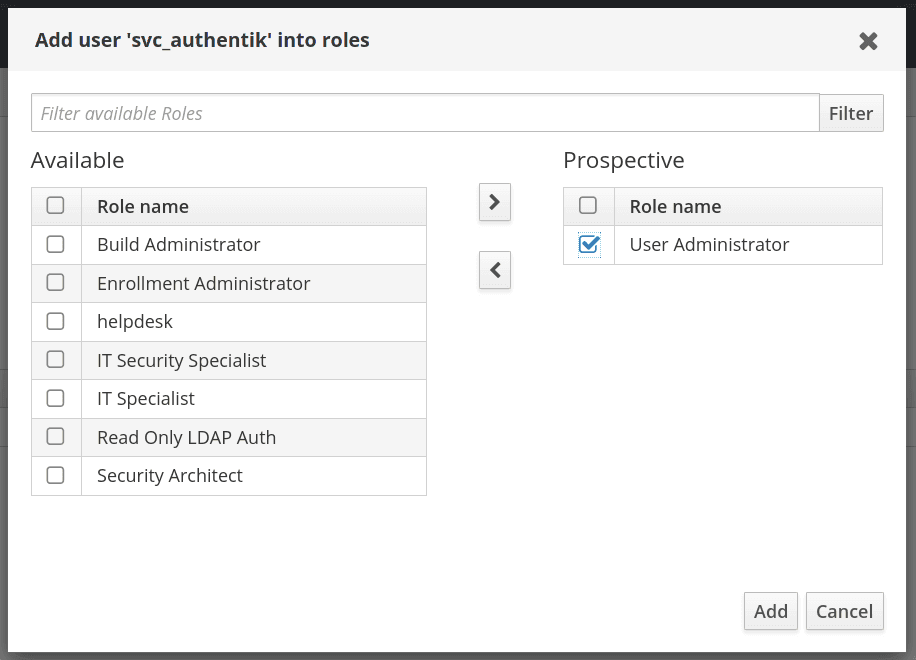
-
By default, if an administrator account resets a user's password in FreeIPA the user's password expires after the first use and must be reset again. This is a security feature to ensure password complexity and history policies are enforced. To bypass this feature for a more seamless experience, you can make the following modification on each of your FreeIPA servers:
$ ldapmodify -x -D "cn=Directory Manager" -W -h ipa1.freeipa.company -p 389

dn: cn=ipa_pwd_extop,cn=plugins,cn=config
changetype: modify
add: passSyncManagersDNs
passSyncManagersDNs: uid=svc_authentik,cn=users,cn=accounts,dc=freeipa,dc=company
authentik Setup
This documentation lists only the settings that you need to change from their default values. Be aware that any changes other than those explicitly mentioned in this guide could cause issues.
See the LDAP Source documentation for more information on these settings.
To create a new LDAP Source in authentik:
-
Log in to authentik as an administrator, and open the authentik Admin interface.
-
Navigate to Directory > Federation and Social Login, click Create, select LDAP Source, and click Next.
-
Configure the following settings:
-
Name: Provide a descriptive name for the LDAP source.
-
Slug: Provide a slug for the LDAP source.
-
Update internal password on login: Enable this if you want users to still be able to log in when FreeIPA is unavailable.
-
Delete not found object: Enable to delete users from authentik when they are deleted in FreeIPA.
-
Under Connection settings:
- Server URI:
ldaps://ipa1.freeipa.companytipYou can specify multiple server URIs separated by commas (e.g.
ldap://ipa1.freeipa.company,ldap://ipa2.freeipa.company); if using a DNS record with multiple entries, authentik will pick one at random on first connection. - Enable StartTLS: Enable for
ldap://protocol, disable forldaps://. - TLS Verification Certificate: Optionally select the certificate used to validate the remote certificate.
- Bind CN:
uid=svc_authentik,cn=users,cn=accounts,dc=freeipa,dc=company - Bind Password: The password for the above user account.
- Base DN:
dc=freeipa,dc=company
- Server URI:
-
Under LDAP Attribute mapping:
- User Property Mappings: Select all Mappings whose names begin with
authentik default LDAPandauthentik default OpenLDAP. Deselect any other Mappings that are selected by default. - Group property mappings: Select
authentik default OpenLDAP Mapping: cn
- User Property Mappings: Select all Mappings whose names begin with
-
Under Additional settings:
- Parent Group: If selected, all synchronized groups will be given this authentik group as a parent.
- User Path: The path that users will be saved under in authentik.
- Addition User/Group DN:
cn=users,cn=accounts - Addition Group DN:
cn=groups,cn=accounts - User object filter:
(objectClass=person) - Group object filter:
(objectClass=groupofnames) - Group membership field:
memberOf - User membership attribute:
distinguishedName - Lookup using user attribute: Enabled.
- Object uniqueness field:
ipaUniqueID
cautionFreeIPA groups can contain nested groups. The
memberOfuser attribute lists all group memberships, direct and indirect.If you want to sync only direct group memberships, use the following settings:
- Group membership field:
member - User membership attribute:
distinguishedName - Lookup using user attribute: Disabled.
-
-
Click Finish.
Manual synchronization
After saving the source, start a synchronization by opening the source, going to the Sync tab, and clicking Run sync again.
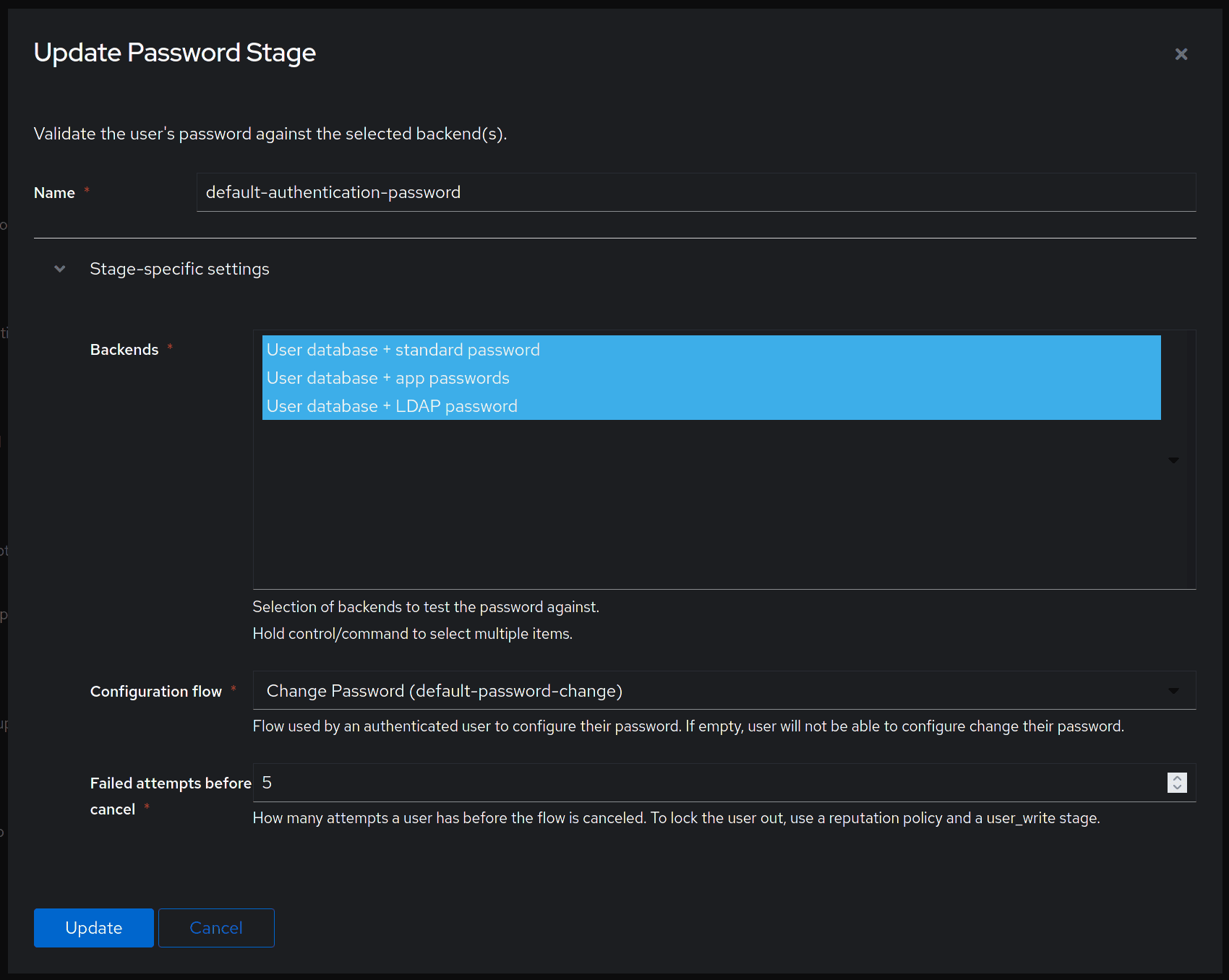
Finally, confirm that the User database + LDAP password backend is selected in Flows and Stages > Stages > Password Stage.
Blueprints
You can also configure the LDAP source with a blueprint:
You must set the username (dn) and password in the environment variables FREEIPA_DN and FREEIPA_PASSWORD.
# yaml-language-server: $schema=https://goauthentik.io/blueprints/schema.json
version: 1
metadata:
    name: FreeIPA LDAP Source
    labels:
        blueprints.goauthentik.io/description: "LDAP Source configuration for FreeIPA"
entries:
    - model: authentik_sources_ldap.ldapsource
      identifiers:
          slug: ldap-source-freeipa
      attrs:
          enabled: true
          base_dn: dc=freeipa,dc=company
          additional_user_dn: cn=users,cn=accounts
          additional_group_dn: cn=groups,cn=accounts
          bind_cn: !Env FREEIPA_DN
          bind_password: !Env FREEIPA_PASSWORD
          delete_not_found_objects: true
          group_membership_field: memberOf
          group_object_filter: (objectClass=groupofnames)
          lookup_groups_from_user: true
          object_uniqueness_field: ipaUniqueID
          server_uri: ldaps://ipa1.freeipa.company,ldaps://ipa2.freeipa.company
          sni: true
          sync_groups: true
          sync_users: true
          sync_users_password: true
          user_membership_attribute: distinguishedName
          user_object_filter: (objectClass=person)
          user_property_mappings:
              - !Find [
                    authentik_sources_ldap.ldapsourcepropertymapping,
                    [managed, goauthentik.io/sources/ldap/openldap-cn],
                ]
              - !Find [
                    authentik_sources_ldap.ldapsourcepropertymapping,
                    [managed, goauthentik.io/sources/ldap/openldap-uid],
                ]
              - !Find [
                    authentik_sources_ldap.ldapsourcepropertymapping,
                    [managed, goauthentik.io/sources/ldap/default-mail],
                ]
              - !Find [
                    authentik_sources_ldap.ldapsourcepropertymapping,
                    [managed, goauthentik.io/sources/ldap/default-dn-path],
                ]
              - !Find [
                    authentik_sources_ldap.ldapsourcepropertymapping,
                    [managed, goauthentik.io/sources/ldap/default-name],
                ]
          group_property_mappings:
              - !Find [
                    authentik_sources_ldap.ldapsourcepropertymapping,
                    [managed, goauthentik.io/sources/ldap/openldap-cn],
                ]
If using LDAP, prepend the server URI with ldap:// and include start_tls: true.